TanStack React AI-Powered Data Management Assistant: Build an AI Chatbot Over Your CRUD Data
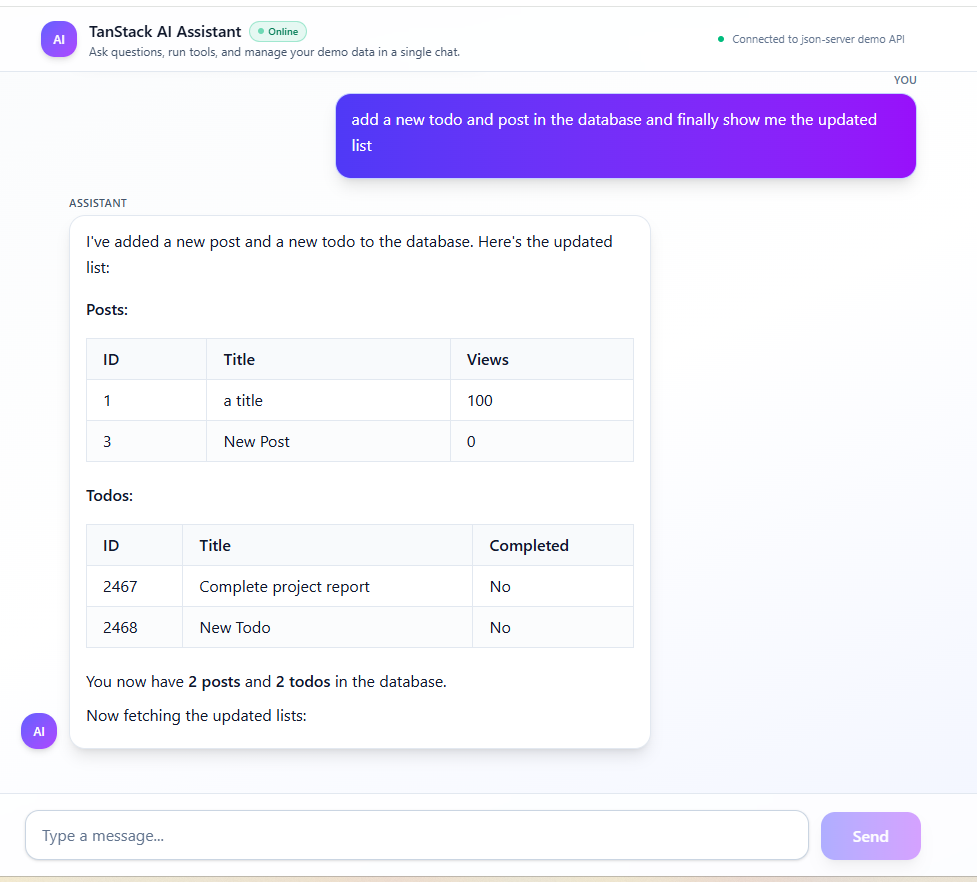
Instead of clicking through a CRUD admin panel, imagine asking a chatbot to “add a new post, mark my first todo as done, and show me the updated tables”. In this tutorial, we'll build that exact experience with TanStack Start, TanStack AI, Anthropic Claude, and a simple json-server backend.
Traditional admin dashboards do the job, but they rarely feel delightful. For simple operations—like checking a couple of posts or updating a todo status—you often have to dig through several screens and forms. With an AI-powered assistant, you flip that around: users describe what they want in natural language, and the assistant decides which tools to call behind the scenes.
In this article we'll walk through the architecture of the TanStack React AI-Powered Data Management Assistant project, and then look at the full frontend and backend code. The final result is a production-ready pattern you can reuse to put an AI layer in front of your own APIs.
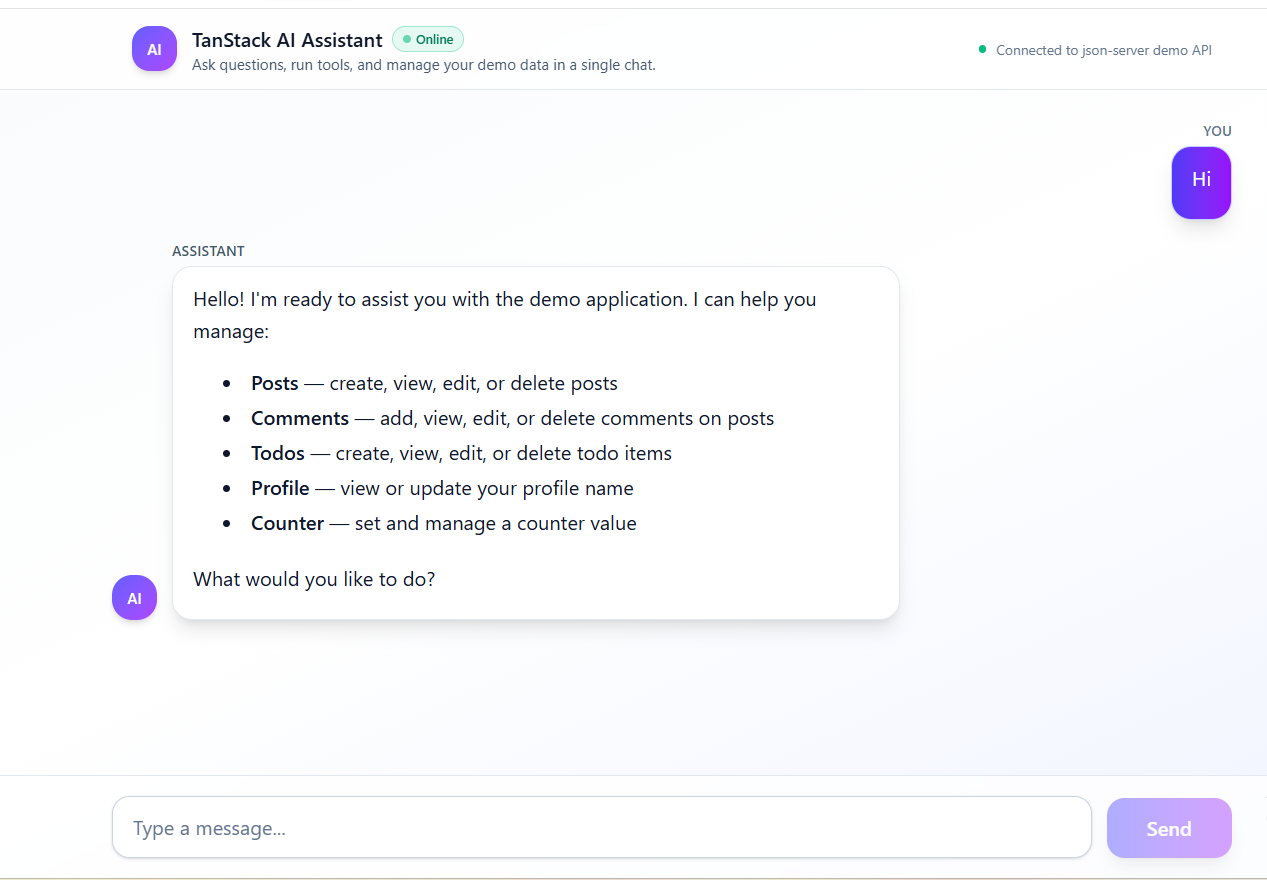
What the assistant can do
The demo uses a json-server backend backed by a simple db.json file. The assistant can:
- List, search, create, update, and delete posts (title + views)
- Manage comments for each post
- Manage todos with completion status
- Read and update a small profile document
- Set a browser-side counter stored in
localStorage
All of that is accessible from a single chat box. The user doesn't need to know anything about endpoints or payload shapes—the AI agent takes care of calling the right tools with the right arguments.
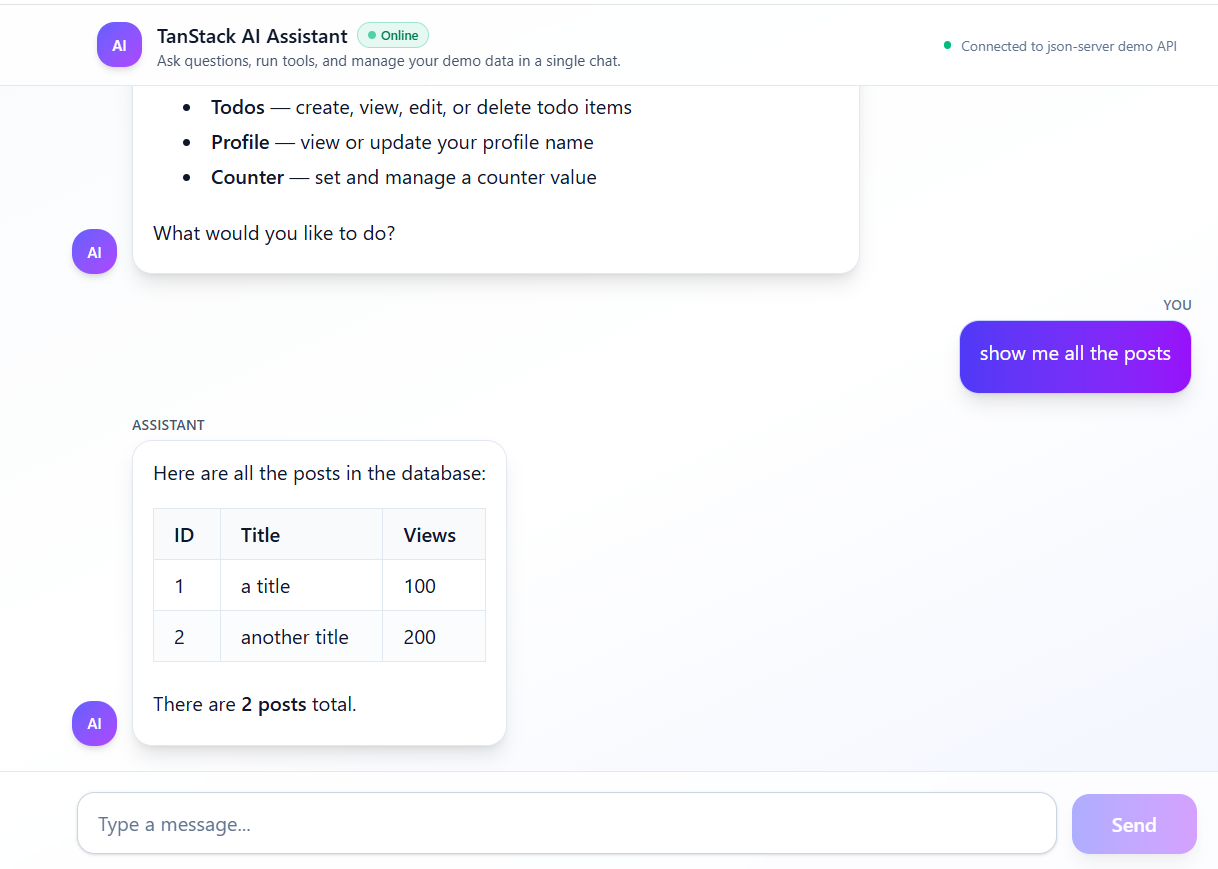
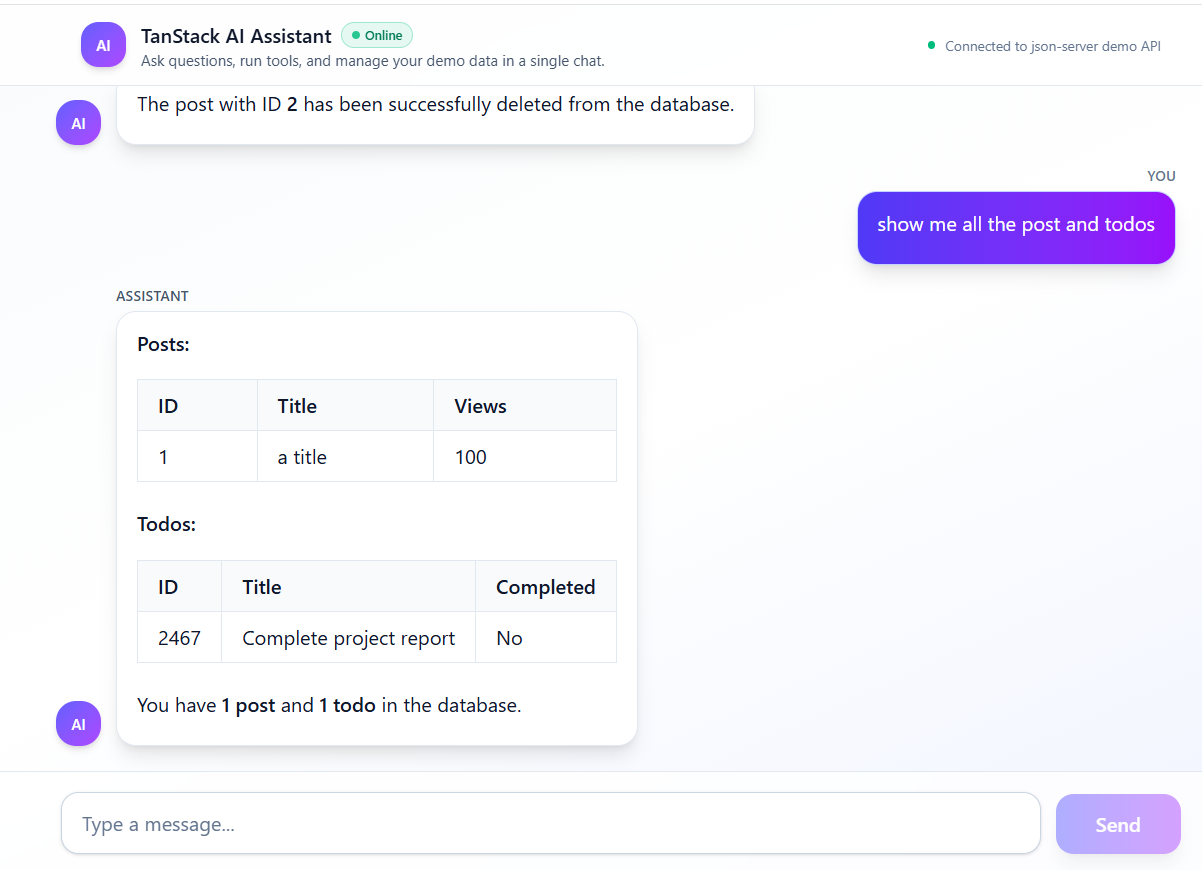
Screenshots: the assistant in action
Let's start with a quick visual tour so you know what we're aiming for.
Backend: tools over a json-server API
On the backend side we don't need a giant framework. A single /api/chat route, powered by @tanstack/ai and the anthropicText adapter, is enough. All the real work happens in tool definitions that wrap the json-server endpoints.
Below is a complete, self-contained version of the chat API inspired by the tanstack-ai-example codebase. It wires up Claude Haiku, defines tools for posts, todos, profile, and a browser counter, and streams responses back to the client using Server-Sent Events.
import { chat, toServerSentEventsResponse, toolDefinition } from "@tanstack/ai";
import { anthropicText } from "@tanstack/ai-anthropic";
import { createFileRoute } from "@tanstack/react-router";
import z from "zod";

const API_BASE_URL = "http://localhost:4000";

export const Route = createFileRoute("/api/chat")({
  server: { handlers: { POST } },
});

export async function POST({ request }: { request: Request }) {
  // 1. Ensure Anthropic key is configured
  if (!process.env.ANTHROPIC_API_KEY) {
    return new Response(
      JSON.stringify({ error: "ANTHROPIC_API_KEY not configured" }),
      { status: 500, headers: { "Content-Type": "application/json" } }
    );
  }

  // 2. Parse and clean incoming messages from the client
  const body = await request.json();
  const rawMessages = Array.isArray(body.messages) ? body.messages : [];
  const messages = rawMessages.map(cleanMessage).filter(Boolean);

  // 3. System prompt that explains how the assistant should behave
  const systemMessage = {
    role: "system" as const,
    content:
      "You are a precise, professional assistant embedded in a demo dashboard. " +
      "Use the available tools to read and update posts, comments, todos, the profile, and the counter. " +
      "After using tools, always send a clear natural-language summary for the user. " +
      "Format tabular data as Markdown tables and keep answers concise and copy-friendly.",
  };

  // 4. Start the streaming chat with tools enabled
  const stream = chat({
    adapter: anthropicText("claude-haiku-4-5"),
    messages: [systemMessage, ...messages],
    tools: [
      listPostsTool,
      addPostTool,
      editPostTool,
      deletePostTool,
      listTodosTool,
      addTodoTool,
      editTodoTool,
      deleteTodoTool,
      getProfileTool,
      updateProfileTool,
      updateCounterToolDef,
    ],
  });

  // 5. Return an SSE response the React client can subscribe to
  return toServerSentEventsResponse(stream);
}

// Utility to strip unknown fields and keep messages in a safe shape
function cleanMessage(input: any) {
  if (!input || typeof input !== "object") return null;
  if (!input.role) return null;

  const msg: any = { role: input.role };

  if (input.content !== null && input.content !== undefined) {
    msg.content = input.content;
  }

  if (Array.isArray(input.parts) && input.parts.length > 0) {
    msg.parts = input.parts;
  }

  if (Array.isArray(input.toolCalls) && input.toolCalls.length > 0) {
    msg.toolCalls = input.toolCalls;
  }

  if (typeof input.toolCallId === "string") {
    msg.toolCallId = input.toolCallId;
  }

  return msg;
}

// ----------------- Posts tools -----------------

const listPostsToolDef = toolDefinition({
  name: "list_posts",
  description: "Fetch all posts from json-server. Can optionally filter by search query.",
  inputSchema: z.object({
    query: z.string().optional(),
  }),
  outputSchema: z.array(
    z.object({
      id: z.string(),
      title: z.string(),
      views: z.number(),
    })
  ),
});

const listPostsTool = listPostsToolDef.server(async (args: any) => {
  const { query } = args as { query?: string };
  const url = new URL(API_BASE_URL + "/posts");
  if (query) url.searchParams.set("q", query);
  const response = await fetch(url.toString());
  if (!response.ok) {
    throw new Error("Failed to fetch posts: " + response.statusText);
  }
  return response.json();
});

const addPostToolDef = toolDefinition({
  name: "add_post",
  description: "Create a new post with a title and optional views count.",
  inputSchema: z.object({
    title: z.string(),
    views: z.number().optional(),
  }),
  outputSchema: z.object({
    id: z.string(),
    title: z.string(),
    views: z.number(),
  }),
});

const addPostTool = addPostToolDef.server(async (args: any) => {
  const { title, views = 0 } = args as { title: string; views?: number };
  const response = await fetch(API_BASE_URL + "/posts", {
    method: "POST",
    headers: { "Content-Type": "application/json" },
    body: JSON.stringify({ title, views }),
  });
  if (!response.ok) {
    throw new Error("Failed to add post: " + response.statusText);
  }
  return response.json();
});

const editPostToolDef = toolDefinition({
  name: "edit_post",
  description: "Update an existing post. ID can be string or number.",
  inputSchema: z.object({
    id: z.union([z.string(), z.number()]),
    title: z.string().optional(),
    views: z.number().optional(),
  }),
  outputSchema: z.object({
    id: z.string(),
    title: z.string(),
    views: z.number(),
  }),
});

const editPostTool = editPostToolDef.server(async (args: any) => {
  const { id, title, views } = args as {
    id: string | number;
    title?: string;
    views?: number;
  };

  const update: any = {};
  if (title !== undefined) update.title = title;
  if (views !== undefined) update.views = views;

  const response = await fetch(API_BASE_URL + "/posts/" + String(id), {
    method: "PATCH",
    headers: { "Content-Type": "application/json" },
    body: JSON.stringify(update),
  });

  if (!response.ok) {
    throw new Error("Failed to update post: " + response.statusText);
  }

  return response.json();
});

const deletePostToolDef = toolDefinition({
  name: "delete_post",
  description: "Delete a post by ID.",
  inputSchema: z.object({
    id: z.union([z.string(), z.number()]),
  }),
  outputSchema: z.object({ success: z.boolean() }),
});

const deletePostTool = deletePostToolDef.server(async (args: any) => {
  const { id } = args as { id: string | number };
  const response = await fetch(API_BASE_URL + "/posts/" + String(id), {
    method: "DELETE",
  });
  if (!response.ok) {
    throw new Error("Failed to delete post: " + response.statusText);
  }
  return { success: true };
});

// ----------------- Todos tools -----------------

const listTodosToolDef = toolDefinition({
  name: "list_todos",
  description: "Fetch all todos from json-server.",
  inputSchema: z.object({
    query: z.string().optional(),
  }),
  outputSchema: z.array(
    z.object({
      id: z.string(),
      title: z.string(),
      completed: z.boolean(),
    })
  ),
});

const listTodosTool = listTodosToolDef.server(async (args: any) => {
  const { query } = args as { query?: string };
  const url = new URL(API_BASE_URL + "/todos");
  if (query) url.searchParams.set("q", query);
  const response = await fetch(url.toString());
  if (!response.ok) {
    throw new Error("Failed to fetch todos: " + response.statusText);
  }
  return response.json();
});

const addTodoToolDef = toolDefinition({
  name: "add_todo",
  description: "Create a new todo item.",
  inputSchema: z.object({
    title: z.string(),
    completed: z.boolean().optional(),
  }),
  outputSchema: z.object({
    id: z.string(),
    title: z.string(),
    completed: z.boolean(),
  }),
});

const addTodoTool = addTodoToolDef.server(async (args: any) => {
  const { title, completed = false } = args as {
    title: string;
    completed?: boolean;
  };
  const response = await fetch(API_BASE_URL + "/todos", {
    method: "POST",
    headers: { "Content-Type": "application/json" },
    body: JSON.stringify({ title, completed }),
  });
  if (!response.ok) {
    throw new Error("Failed to add todo: " + response.statusText);
  }
  return response.json();
});

const editTodoToolDef = toolDefinition({
  name: "edit_todo",
  description: "Update an existing todo item.",
  inputSchema: z.object({
    id: z.union([z.string(), z.number()]),
    title: z.string().optional(),
    completed: z.boolean().optional(),
  }),
  outputSchema: z.object({
    id: z.string(),
    title: z.string(),
    completed: z.boolean(),
  }),
});

const editTodoTool = editTodoToolDef.server(async (args: any) => {
  const { id, title, completed } = args as {
    id: string | number;
    title?: string;
    completed?: boolean;
  };

  const update: any = {};
  if (title !== undefined) update.title = title;
  if (completed !== undefined) update.completed = completed;

  const response = await fetch(API_BASE_URL + "/todos/" + String(id), {
    method: "PATCH",
    headers: { "Content-Type": "application/json" },
    body: JSON.stringify(update),
  });

  if (!response.ok) {
    throw new Error("Failed to update todo: " + response.statusText);
  }

  return response.json();
});

const deleteTodoToolDef = toolDefinition({
  name: "delete_todo",
  description: "Delete a todo by ID.",
  inputSchema: z.object({
    id: z.union([z.string(), z.number()]),
  }),
  outputSchema: z.object({ success: z.boolean() }),
});

const deleteTodoTool = deleteTodoToolDef.server(async (args: any) => {
  const { id } = args as { id: string | number };
  const response = await fetch(API_BASE_URL + "/todos/" + String(id), {
    method: "DELETE",
  });
  if (!response.ok) {
    throw new Error("Failed to delete todo: " + response.statusText);
  }
  return { success: true };
});

// ----------------- Profile tools -----------------

const getProfileToolDef = toolDefinition({
  name: "get_profile",
  description: "Read the profile document from json-server.",
  inputSchema: z.object({}),
  outputSchema: z.object({
    name: z.string(),
  }).passthrough(),
});

const getProfileTool = getProfileToolDef.server(async () => {
  const response = await fetch(API_BASE_URL + "/profile");
  if (!response.ok) {
    throw new Error("Failed to fetch profile: " + response.statusText);
  }
  return response.json();
});

const updateProfileToolDef = toolDefinition({
  name: "update_profile",
  description: "Update the profile name field.",
  inputSchema: z.object({
    name: z.string(),
  }),
  outputSchema: z.object({
    name: z.string(),
  }).passthrough(),
});

const updateProfileTool = updateProfileToolDef.server(async (args: any) => {
  const { name } = args as { name: string };
  const response = await fetch(API_BASE_URL + "/profile", {
    method: "PATCH",
    headers: { "Content-Type": "application/json" },
    body: JSON.stringify({ name }),
  });
  if (!response.ok) {
    throw new Error("Failed to update profile: " + response.statusText);
  }
  return response.json();
});

// ----------------- Counter tool (bridges to client) -----------------

export const updateCounterToolDef = toolDefinition({
  name: "set_count",
  description:
    "Set the counter value stored in the browser and optionally trigger a page reload.",
  inputSchema: z.object({
    count: z.number(),
    reloadPage: z.boolean().optional(),
  }),
  outputSchema: z.object({ success: z.boolean() }),
});
Tools for comments, todos, and profile follow the same pattern: describe input and output with Zod, then implement a small server function that talks to json-server. The model now has a clear contract for what it can do with your data.
Frontend: chat UI with TanStack AI React
On the client we use @tanstack/ai-react to manage the streaming chat state and connect to /api/chat over Server-Sent Events. The main chat component lives in src/components/chat.tsx in the demo, but the pattern below is all you need: wire useChat to a message list, a form, and a small counter tool.
"use client";

import { useEffect, useRef, useState } from "react";
import { fetchServerSentEvents, useChat } from "@tanstack/ai-react";
import { clientTools } from "@tanstack/ai-client";
import { updateCounterToolDef } from "@/routes/api/chat";

// Client-side implementation for the `set_count` tool.
const updateCounterTool = updateCounterToolDef.client(((args: unknown) => {
  const payload = (args as { count?: number; reloadPage?: boolean }) || {};
  const count = typeof payload.count === "number" ? payload.count : 0;
  const reloadPage = payload.reloadPage;

  window.localStorage.setItem("counter", String(count));

  if (reloadPage !== false) {
    setTimeout(() => {
      window.location.reload();
    }, 2000);
  }

  return { success: true };
}) as any);

export function Chat() {
  const [input, setInput] = useState("");
  const bottomRef = useRef<HTMLDivElement | null>(null);

  // Hydrate messages from localStorage on first render
  const [initialMessages] = useState(() => {
    if (typeof window === "undefined") return [];
    try {
      const raw = window.localStorage.getItem("chatMessages");
      return raw ? JSON.parse(raw) : [];
    } catch {
      return [];
    }
  });

  const { messages, sendMessage, isLoading } = useChat({
    connection: fetchServerSentEvents("/api/chat"),
    tools: clientTools(updateCounterTool),
    initialMessages,
  });

  // Persist messages whenever they change
  useEffect(() => {
    if (!messages || messages.length === 0) return;
    window.localStorage.setItem("chatMessages", JSON.stringify(messages));
  }, [messages]);

  // Auto-scroll when a new message arrives
  useEffect(() => {
    if (!bottomRef.current) return;
    bottomRef.current.scrollIntoView({ behavior: "smooth", block: "end" });
  }, [messages, isLoading]);

  const handleSubmit = (event: React.FormEvent) => {
    event.preventDefault();
    if (!input.trim() || isLoading) return;
    sendMessage(input.trim());
    setInput("");
  };

  return (
    <div className="flex flex-col h-screen bg-gradient-to-br from-slate-50 via-white to-indigo-50">
      <header className="border-b border-slate-200 bg-white/80 backdrop-blur-sm">
        <div className="max-w-4xl mx-auto px-4 py-3 flex items-center justify-between gap-3">
          <div className="flex items-center gap-3">
            <div className="h-9 w-9 rounded-xl bg-gradient-to-br from-indigo-500 to-purple-500 flex items-center justify-center shadow-md">
              <span className="text-xs font-semibold text-white">AI</span>
            </div>
            <div>
              <div className="flex items-center gap-2">
                <h1 className="text-sm sm:text-base font-semibold text-slate-900">
                  TanStack AI Assistant
                </h1>
                <span className="hidden sm:inline-flex items-center gap-1 rounded-full bg-emerald-500/10 px-2 py-0.5 text-[10px] font-medium text-emerald-700 border border-emerald-500/30">
                  <span className="h-1.5 w-1.5 rounded-full bg-emerald-500 animate-pulse" />
                  Online
                </span>
              </div>
              <p className="text-[11px] sm:text-xs text-slate-600">
                Ask questions, run tools, and manage your demo data in a single chat.
              </p>
            </div>
          </div>
          <div className="hidden sm:flex items-center gap-2 text-[11px] text-slate-500">
            <span className="h-1.5 w-1.5 rounded-full bg-emerald-500" />
            <span>Connected to json-server demo API</span>
          </div>
        </div>
      </header>

      <div className="flex-1 overflow-y-auto px-3 sm:px-4 md:px-6 py-4">
        <div className="max-w-4xl mx-auto space-y-4">
          {messages.map((message: any) => (
            <div
              key={message.id || Math.random()}
              className={
                message.role === "assistant"
                  ? "flex items-start gap-3"
                  : "flex items-start gap-3 justify-end"
              }
            >
              {message.role === "assistant" && (
                <div className="h-8 w-8 rounded-2xl bg-gradient-to-br from-indigo-500 to-purple-500 flex items-center justify-center shadow-md text-xs text-white font-semibold">
                  AI
                </div>
              )}
              <div
                className={
                  "max-w-[80%] rounded-2xl px-4 py-3 shadow-lg border text-sm leading-relaxed " +
                  (message.role === "assistant"
                    ? "bg-white border-slate-200 text-slate-900"
                    : "bg-gradient-to-r from-indigo-600 to-purple-600 border-indigo-200 text-white")
                }
              >
                <p className="whitespace-pre-wrap break-words">
                  {typeof message.content === "string"
                    ? message.content
                    : JSON.stringify(message.content)}
                </p>
              </div>
            </div>
          ))}

          {isLoading && (
            <div className="flex items-center gap-2 text-xs text-slate-600">
              <span className="h-2 w-2 rounded-full bg-indigo-500 animate-pulse" />
              <span>Assistant is typing…</span>
            </div>
          )}

          <div ref={bottomRef} />
        </div>
      </div>

      <form
        onSubmit={handleSubmit}
        className="border-t border-slate-200 bg-white/80 backdrop-blur-sm p-3 sm:p-4"
      >
        <div className="max-w-4xl mx-auto flex gap-2 sm:gap-3 items-end">
          <input
            type="text"
            value={input}
            onChange={(event) => setInput(event.target.value)}
            placeholder="Ask the assistant to manage your posts, todos, or profile…"
            className="flex-1 px-4 py-2.5 sm:py-3 rounded-xl bg-white text-slate-900 placeholder:text-slate-500 border border-slate-300 focus:outline-none focus:ring-2 focus:ring-indigo-500 focus:border-indigo-500 transition-all text-sm sm:text-base shadow-sm"
            disabled={isLoading}
          />
          <button
            type="submit"
            disabled={!input.trim() || isLoading}
            className="px-6 sm:px-8 py-2.5 sm:py-3 bg-gradient-to-r from-indigo-500 to-purple-500 text-white rounded-xl font-medium shadow-lg hover:shadow-xl disabled:opacity-50 disabled:cursor-not-allowed transition-all text-sm sm:text-base hover:scale-[1.02] active:scale-[0.99]"
          >
            Send
          </button>
        </div>
      </form>
    </div>
  );
}
Messages are rendered in a modern, responsive layout with avatars, subtle gradients, and a typing indicator. Assistant messages are passed through a FormattedText helper that understands basic Markdown, lists, tables, and code blocks so the output is easy to read and copy.
A nice UX touch is chat history persistence: messages are stored in localStorage, cleaned up to remove tool-only noise, and rehydrated into useChat when the page reloads. That means users can refresh without losing context.
Putting it together and extending the pattern
The end result of this setup is a small but powerful pattern: expose your data through tools, let the LLM choose which tools to call, and keep the UI focused on a great chat experience. json-server makes it easy to prototype, but you can swap it for real microservices or a production API layer without changing the core architecture.
To adapt this assistant to your own project, you can:
- Replace
db.jsonwith endpoints that talk to your real database. - Add new tools for resources like invoices, projects, or tickets.
- Tune the system prompt to match your brand voice and safety requirements.
Once you've done that, you can ship an AI-powered operations dashboard where users manage data by describing outcomes instead of hunting for the right buttons. That's the real power of combining TanStack React with a modern LLM like Claude.
Related Articles
TanStack Table Implementation in React: Complete Guide
Learn how to build rich data tables with TanStack Table, including sorting, filtering, and pagination.
React Router Setup: Complete Guide for React Applications
A practical walkthrough for setting up React Router and structuring your routes in real projects.